Winternals Series – Virtual Memory
Virtual Memory is a fundamental concept in modern operating systems that provides each process with an isolated, contiguous address space abstracted from physical memory. Understanding how Windows manages virtual memory is essential for security researchers, malware analysts, and reverse engineers.
Contents
| Section | Description |
|---|---|
| Overview | Introduction to virtual memory concepts |
| Virtual Memory Sizes | Address space sizes across architectures |
| x86/32-bit Systems | 32-bit address space layout and extensions |
| x64/64-bit Systems | 64-bit address space layout |
| Key Takeaways | Summary of important concepts |
| References | Additional resources |
Overview
Memory in modern operating systems is not mapped directly to physical memory (i.e the RAM). Instead, virtual memory addresses are used by processes that are mapped to physical memory addresses. There are several reasons for this but ultimately the goal is to save as much physical memory as possible. Virtual memory may be mapped to physical memory but can also be stored on disk. With virtual memory addressing it becomes possible for multiple processes to share the same physical address while having a unique virtual memory address.
See the image below from the Windows Internals book.
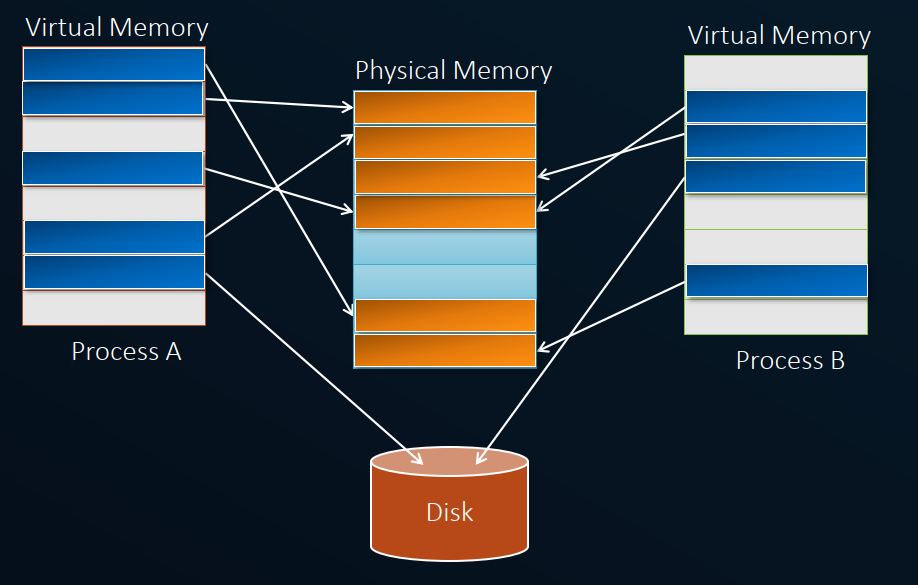
Mapping virtual memory to physical memory with paging.
Windows uses a flat address space to create the illusion of a giant, private memory space for each program. This means programs see a continuous memory layout even though it might be spread across both RAM and hard disk. The memory manager, working with hardware, translates virtual addresses used by programs into actual physical locations where data is stored. By controlling this translation and access, Windows prevents programs from interfering with each other or the operating system itself.
Virtual memory relies on the concept of Memory paging which divides memory into chunks of 4KB called “pages” in the Windows operating system. As real memory is limited compared to running programs’ virtual needs, the memory manager “pages” unused data to disk. This frees up RAM for other processes or the system itself. If a program needs something that’s been paged out, the virtual memory manager brings it back from disk on demand.
The beauty of paging is its transparency. Programs don’t need to be modified or even aware of this juggling act. The memory manager, with the help of special hardware, seamlessly translates virtual addresses (the program’s view) to physical addresses (where the data actually resides). When a program needs a page that’s been sent to the hard drive, the memory manager simply swaps it back into RAM, keeping the program running smoothly without any hiccups.
Virtual Memory Sizes
The size of the virtual memory differs across the different architectures. In 32-bit systems, the total virtual address space has a theoretical maximum of 4 GB whereas in 64-bit systems the can extend up to 2^64 bytes, which is an astronomically large number (18.4 million terabytes), however, the actual amount of virtual memory available to a process is typically constrained by practical limitations, such as the amount of physical RAM installed on the system and the configuration settings.
In the Windows OS, the virtual address space is divided into 2 halves:
- Kernel/System address space (Higher addresses) - Allocated to the OS itself for its own protected memory utilization
- User address space (Lower Addresses) - Allocated to processes for their private storage
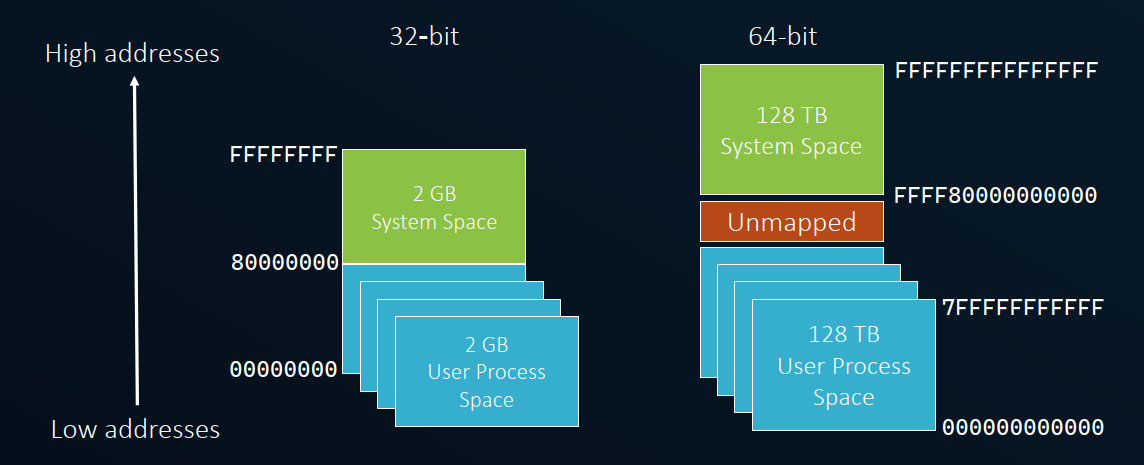
x86/32-bit Systems
| Property | Value |
|---|---|
| Total Maximum virtual memory size | 4 GB |
| Address Range | 0x00000000 – 0xFFFFFFFF |
| Kernel Address Space | 0x80000000 – 0xFFFFFFFF |
| User Address Space | 0x00000000 – 0x7FFFFFFF |
Address Windowing Extensions (AWE)
Address Windowing Extensions (AWE) is a technology in Microsoft Windows that was primarily designed for 32-bit versions of the operating system. The main purpose of AWE is to allow 32-bit Windows applications to access more physical memory than the default 4 GB limit imposed by the 32-bit memory address space.
In a standard 32-bit Windows environment, each process has a 4 GB virtual address space, and this address space is typically split between the application and the operating system. This limitation poses challenges for applications that need to work with large datasets or require more memory.
AWE enables applications, particularly those with demanding memory requirements like databases or certain scientific applications, to use more than 4 GB of physical memory. Here’s how it works:
-
Physical Address Extension (PAE): AWE relies on PAE, a feature of certain 32-bit processors, to address more than 4 GB of physical memory. PAE extends the physical address space from 32 bits to 36 bits, allowing access to up to 64 GB of RAM.
-
Windowed Mapping: AWE uses a mechanism called “windowed mapping” to map portions of the physical memory into the 32-bit virtual address space of an application. This allows the application to use more than 4 GB of memory in a windowed fashion.
Note: AWE is specific to 32-bit versions of Windows and is not applicable to 64-bit versions. In 64-bit systems, applications can directly address much larger amounts of memory without the need for AWE or similar workarounds.
IncreaseUserVa Option
The IncreaseUserVa setting, or more commonly known as the “IncreaseUserVa” boot option, is related to the Address Windowing Extensions (AWE) feature in Windows. This option allows you to increase the user-mode virtual address space available to applications on 32-bit versions of Windows.
By default, 32-bit Windows allocates a 2 GB virtual address space for user-mode processes and 2 GB for the system. The “IncreaseUserVa” boot option allows you to adjust this balance, potentially giving more virtual address space to user-mode applications. This can be useful for applications that require more memory for their data, such as large databases.
How to use the IncreaseUserVa boot option:
1. Accessing Boot Configuration Data (BCD):
Open a Command Prompt with administrative privileges and use the bcdedit command-line tool.
2. Check Current Settings:
bcdedit /v
This will display the current boot configuration settings.
3. Modify the IncreaseUserVa Option:
bcdedit /set increaseuserva <value>
Replace <value> with the amount of additional virtual address space you want to allocate to user-mode applications. The value is in megabytes:
2048= 3 GB for user-mode processes3072= 3.5 GB for user-mode processes
4. Reboot:
After making changes, restart your computer for the changes to take effect.
LARGEADDRESSAWARE Flag
To leverage the increased address space for your program, the large address space-aware flag must be set in the header of the executable image. During compile time, the /LARGEADDRESSAWARE option should be set which tells the linker that the application can handle addresses larger than 2GB.

In the 64-bit compilers, this option is enabled by default. In the 32-bit compilers,
/LARGEADDRESSAWARE:NOis enabled if/LARGEADDRESSAWAREis not otherwise specified on the linker line.
x64/64-bit Systems
| Property | Value |
|---|---|
| Theoretical Maximum | 2^64 bytes (18.4 million TB) |
| Current CPU Support | 48 bits addressing |
| Actual Addressable | 2^48 = 256 TB |
| Kernel Address Space | 128 TB |
| User Address Space | 128 TB |
| Address Range | 0x000000000000 – 0xFFFFFFFFFFFF |
| Kernel Address Space | 0xFFFF800000000000 – 0xFFFFFFFFFFFFFFFF |
| User Address Space | 0x0000000000000000 – 0x00007FFFFFFFFFFF |
Current CPU architectures only support 48 bits addressing, which gives us:
- 2^48 = 256 TB total addressable space
- 128 TB for kernel address space
- 128 TB for user address space
Key Takeaways
| Concept | Key Point |
|---|---|
| Process Isolation | Each process has its own private virtual address space |
| Paging | Unused pages can be stored on disk to free physical memory |
| Transparency | Applications don’t need to be aware of physical memory layout |
| 32-bit Limits | 4 GB total address space, split between user and kernel |
| 64-bit Capacity | 256 TB addressable (48-bit), split 128 TB each for user/kernel |
| AWE & PAE | Workarounds for 32-bit memory limitations |